StackHPC Release Train
StackHPC provides packages, container images, and host images for OpenStack via Ark. These artifacts are built and released using a process known as the Release Train.
Deployments should use a local Pulp repository server to synchronise content from Ark and serve it locally. This reduces Internet bandwidth requirements for package and container downloads. Content is synced on demand from Ark to the local Pulp, meaning that the local Pulp acts like a pull-through cache.
Access to the repositories on Ark is controlled via user accounts issued by StackHPC.
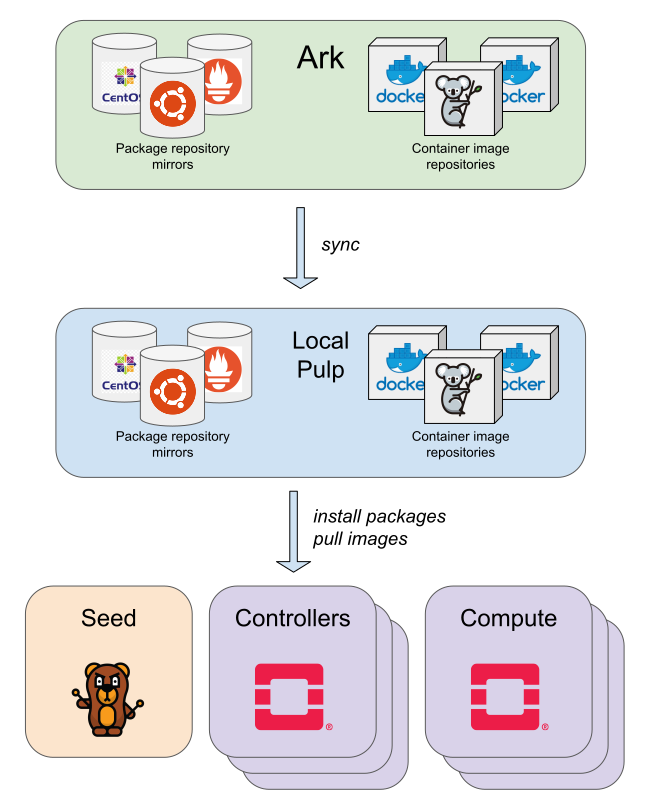
All content on Ark is versioned, meaning that a deployment may continue to use older package repository snapshots and container images when newer content is released. This allows for improved reliability & repeatability of deployments.
This configuration defines two Pulp distributions for
packages, development and production. This allows packages to be
updated and tested in a development or staging environment before rolling them
out to production. Typically a given environment will always use the same
distribution, meaning that package repository configuration files do not need
to be updated on control plane hosts in order to consume a package update.
Configuration
This configuration provides the following:
Configuration to deploy a local Pulp service as a container on the seed
Pulp repository definitions for CentOS Stream 8, Rocky Linux 8/9 and Ubuntu Focal/Jammy
Playbooks to synchronise a local Pulp service with Ark
Configuration to use the local Pulp repository mirrors on control plane hosts
Configuration to use the local Pulp container registry on control plane hosts
Configuration to deploy pre-built OS images to overcloud hosts using Bifrost
Local Pulp server
The Pulp container is deployed on the seed by default, but may be disabled by
setting seed_pulp_container_enabled to false in
etc/kayobe/seed.yml.
The URL and credentials of the local Pulp server are configured in
etc/kayobe/pulp.yml via pulp_url, pulp_username and
pulp_password. In most cases, the default values should be sufficient.
An admin password must be generated and set as the value of a
secrets_pulp_password variable, typically in an Ansible Vault encrypted
etc/kayobe/secrets.yml file. This password will be automatically set on
Pulp startup.
If a proxy is required to access the Internet from the seed, pulp_proxy_url
may be used.
Host images are not synchronised to the local Pulp server, since they should only be pulled to the seed node once. More information on host images can be found here.
StackHPC Ark
The Ark pulp credentials issued by StackHPC should be configured in
etc/kayobe/pulp.yml, using Ansible Vault to encrypt the password:
stackhpc_release_pulp_username: <username>
stackhpc_release_pulp_password: <password>
Package repositories
CentOS Stream 8, Rocky Linux 8/9 and Ubuntu Focal/Jammy package repositories are
synced based on the value of os_distribution and os_release . If you
need to sync multiple RHEL-like distributions or Ubuntu releases,
stackhpc_pulp_sync_centos_stream8, stackhpc_pulp_sync_rocky_8
stackhpc_pulp_sync_rocky_9, stackhpc_pulp_sync_ubuntu_jammy and
stackhpc_pulp_sync_ubuntu_focal in etc/kayobe/pulp.yml may be set to
true.
On Ark, each package repository provides versioned snapshots using a datetime
stamp (e.g. 20220817T082321). The current set of tested versions is defined
in etc/kayobe/pulp-repo-versions.yml. This file is managed by the StackHPC
Release Train and should generally not be modified by consumers of this
repository.
Package managers
For Ubuntu Focal and Jammy systems, the package manager configuration is provided by
stackhpc_apt_repositories in etc/kayobe/apt.yml.
The configuration is applied by default to all Ubuntu Focal and Jammy hosts. The
configuration can be overridden by changing the repository definitions in
apt_repositories or toggling apt_disable_sources_list to use the default
apt repositories. This can be done on a host-by host basis by defining the
variables as host or group vars under etc/kayobe/inventory/host_vars or
etc/kayobe/inventory/group_vars.
For Ubuntu-based deployments, Pulp currently lacks support for certain types of content,
including i18n files and command-not-found indices. This breaks APT when the
command-not-found package is installed:
E: Failed to fetch https://pulp.example.com/pulp/content/ubuntu/jammy-security/development/dists/jammy-security/main/cnf/Commands-amd64 404 Not Found
The purge-command-not-found.yml custom playbook can be used to uninstall
the package, prior to running any other APT commands. It may be installed as a
pre-hook to the host
configure commands. Note that if used as a hook, this playbook matches all
hosts, so will run against the seed, even when running overcloud host
configure. Depending on the stage of deployment, some hosts may be
unreachable.
For CentOS and Rocky Linux based systems, package manager configuration is
provided by stackhpc_dnf_repos in etc/kayobe/dnf.yml, which points to
package repositories on the local Pulp server. To use this configuration, the
dnf_custom_repos variable must be set, and this is done for hosts in the
overcloud group via the group_vars file
etc/kayobe/inventory/group_vars/overcloud/stackhpc-dnf-repos. Similar
configuration may be added for other groups, however there may be ordering
issues during initial deployment when Pulp has not yet been deployed.
In both instances, the configuration points to package repositories on the local Pulp server.
The distribution name for the environment should be configured as either
development or production via stackhpc_repo_distribution in
etc/kayobe/stackhpc.yml.
Ceph container images
By default, Ceph images are not synced from quay.io to the local Pulp. To sync
these images, set stackhpc_sync_ceph_images to true.
HashiCorp container images
By default, HashiCorp images (Consul and Vault) are not synced from Docker Hub
to the local Pulp. To sync these images, set stackhpc_sync_hashicorp_images
to true.
Custom container images
A custom list of container images can be synced to the local Pulp using the
stackhpc_pulp_repository_container_repos_extra and
stackhpc_pulp_distribution_container_extra variables.
# List of extra container image repositories.
stackhpc_pulp_repository_container_repos_extra:
  - name: "certbot/certbot"
    url: "https://registry-1.docker.io"
    policy: on_demand
    proxy_url: "{{ pulp_proxy_url }}"
    state: present
    include_tags: "nightly"
    required: True

# List of extra container image distributions.
stackhpc_pulp_distribution_container_extra:
  - name: certbot
    repository: certbot/certbot
    base_path: certbot/certbot
    state: present
    required: True
Usage
The local Pulp service will be deployed as a Seed custom container
on next kayobe seed service deploy or kayobe seed service upgrade.
The following custom playbooks are provided in etc/kayobe/ansible/:
See the Kayobe custom playbook documentation for information on how to run them.
pulp-repo-sync.yml: Pull packages from Ark to the local Pulp. This will create a new repository version (snapshot) for each repository in the local Pulp server when new packages are available. The new packages will not be available to cloud nodes until they have been published.pulp-repo-publish.yml: Publish synchronised packages to thedevelopmentdistribution in the local Pulp. This will make synchronised packages available to cloud nodes using thedevelopmentdistribution (typically a development or staging environment). The new packages will not be available to cloud nodes using theproductiondistribution until they have been promoted.pulp-repo-promote-production.yml: Promote packages in thedevelopmentdistribution to theproductiondistribution in the local Pulp. This will make all packages currently available to cloud nodes using thedevelopmentdistribution also available to cloud nodes using theproductiondistribution. Typically this would be done only once the new packages have been validated in a development or staging environment.pulp-container-sync.yml: Pull container images from Ark to the local Pulp. This will create a new repository version (snapshot) for each repository in the local Pulp server when new image tags are available. If these are new container image repositories, then the new image tags will not be available to cloud nodes until they have been published.pulp-container-publish.yml: Publish synchronised container images in the local Pulp. This will make synchronised container images available to cloud nodes.
Syncing content
A typical workflow to sync all packages and containers is as follows:
kayobe playbook run $KAYOBE_CONFIG_PATH/ansible/pulp-repo-sync.yml
kayobe playbook run $KAYOBE_CONFIG_PATH/ansible/pulp-repo-publish.yml
kayobe playbook run $KAYOBE_CONFIG_PATH/ansible/pulp-container-sync.yml
kayobe playbook run $KAYOBE_CONFIG_PATH/ansible/pulp-container-publish.yml
Once the content has been tested in a test/staging environment, it may be promoted to production:
kayobe playbook run $KAYOBE_CONFIG_PATH/ansible/pulp-repo-promote-production.yml
Synchronising all Kolla container images can take a long time. A limited list
of images can be synchronised using the stackhpc_pulp_images_kolla_filter
variable, which accepts a whitespace-separated list of regular expressions
matching Kolla image names. Usage is similar to kolla-build CLI arguments.
For example:
kayobe playbook run $KAYOBE_CONFIG_PATH/ansible/pulp-container-sync.yml -e stackhpc_pulp_images_kolla_filter='"^glance nova-compute$"'
Initial seed deployment
During the initial seed deployment, there is an ordering issue where the Bifrost container will not yet have been synced, but the local Pulp container has not yet been deployed. This can be avoided with the following workflow:
kayobe seed service deploy --tags seed-deploy-containers --kolla-tags none
kayobe playbook run $KAYOBE_CONFIG_PATH/ansible/pulp-container-sync.yml
kayobe playbook run $KAYOBE_CONFIG_PATH/ansible/pulp-container-publish.yml
kayobe seed service deploy
Working with pulp
The pulp CLI tool can be used to administer your local pulp installation. Please follow the upstream documentation for installation instructions.
pulp CLI tricks
Saving credentials
This is useful to avoid the need to always supply your credentials when running commands from the command line:
(venv-pulp) [stack@seed ~]$ pulp config create --username admin --base-url http://<pulp server>:8080 --password <password>
Troubleshooting
HTTP Error 400: Bad Request {“name”:[“This field must be unique.”]}
If you have previously tried to push an image to pulp e.g for local testing, you may
see this message when you later try to run pulp-container-sync.yml:
TASK [stackhpc.pulp.pulp_repository : Setup container repositories] *****************************
failed: [localhost] (item=stackhpc/centos-source-prometheus-jiralert) => changed=false
ansible_loop_var: item
item:
  name: stackhpc/centos-source-prometheus-jiralert
  policy: on_demand
  remote_password: password
  remote_username: username
  state: present
  url: https://ark.stackhpc.com
msg: 'HTTP Error 400: Bad Request b''{"name":["This field must be unique."]}'''
The issue is that pushing an image automatically creates a container-push repository which conflicts with the creation of a regular container repository of the same name. You can resolve this conflict by deleting the distribution associated with the push repository using the pulp CLI:
(venv-pulp) [stack@seed ~]$ pulp --base-url http://<pulp server>:8080--username admin --password <password> container distribution destroy --name stackhpc/centos-source-prometheus-jiralert
Started background task /pulp/api/v3/tasks/1f0a474a-b7c0-44b4-9ef4-ed633077f4d8/
.Done.
HTTP Error 404: Not Found
If your login credentials are incorrect, or lack the required permissions,
you will see a 404 error during pulp-repo-sync.yml:
TASK [stackhpc.pulp.pulp_repository : Sync RPM remotes into repositories] ****************************************************************************************************************************************
An exception occurred during task execution. To see the full traceback, use -vvv. The error was: Exception: Task failed to complete. (failed; 404, message='Not Found', url=URL('https://ark.stackhpc.com/pulp/content/centos/8-stream/BaseOS/x86_64/os/20211122T102435'))
failed: [localhost] (item=centos-stream-8-baseos-development) => changed=false
  ansible_loop_var: item
  item:
    name: centos-stream-8-baseos-development
    policy: on_demand
    proxy_url: __omit_place_holder__d35452c39719f081229941a64fd2cdce1188a287
    remote_password: <password>
    remote_username: <username>
    required: true
    state: present
    sync_policy: mirror_complete
    url: https://ark.stackhpc.com/pulp/content/centos/8-stream/BaseOS/x86_64/os/20211122T102435
  msg: Task failed to complete. (failed; 404, message='Not Found', url=URL('https://ark.stackhpc.com/pulp/content/centos/8-stream/BaseOS/x86_64/os/20211122T102435')) '''
The issue can be rectified by updating the stackhpc_release_pulp_username
and stackhpc_release_pulp_password variables.